
Short answer: Start with the thermostat — confirm it's set to 'Heat,' the temperature is above room temp, and the batteries aren't dead. Next, check the circuit breaker and replace a dirty filter. These three steps resolve most no-heat calls without a service visit.
If your heat stops, start with a few safe checks you can do now. Confirm the thermostat is set to HEAT, check power at the breaker and the furnace switch, and replace thermostat batteries. If you smell gas or a CO alarm sounds, leave and call emergency services right away. For guidance on system safety and common causes, see the.
Key Takeaways
- Use a room-by-room Manual J load calculation (not a square-foot rule).
- Select equipment with Manual S and verify ducts with Manual D for comfort and efficiency.
- Avoid oversizing: short-cycling wastes fuel and can create uneven temperatures.
Heat Not Working in House? Quick safety checks
If your home loses heat, begin with safety. A rapid check helps you spot hazards that need an immediate emergency response. Do not attempt internal repairs if you smell gas, hear continuous alarms, or see flame or smoke. Leave and call emergency services.
After confirming there is no immediate hazard, gather basic system facts. Note the furnace or heat pump make and model. Photograph the unit label, the thermostat display, and any error lights. This information reduces time when talking to a technician.
Immediate safety steps
If you detect a strong gas smell, a carbon monoxide alarm, visible flames, or heavy smoke, evacuate the house. Go to a safe outdoor location and call 911 or the gas company from outside. Avoid switching lights or touching electronics inside the home. These steps protect everyone until trained responders arrive.
Record basic system information
Before you do anything else, write down the model and serial number and the age of your heating unit. Note recent service dates, warranty data, and what rooms are affected. Photos and a short timeline of events make diagnostics faster and help the technician decide if an urgent visit is needed.
Is the thermostat calling for heat?
A surprising number of “no heat” calls are due to the thermostat not asking for heat. Start here because it is safe and often resolves the problem. Confirm the thermostat mode, the setpoint, and that the display shows a call for heat.
If the thermostat appears off or the screen is blank, check power sources such as the breaker and the local furnace switch. Replace batteries if the unit uses them. If the thermostat is smart and online, check the app for alerts or schedule settings that may block heat.
Did you set the thermostat to heat?
Make sure the thermostat mode reads HEAT and not COOL or OFF. Raise the setpoint a few degrees to force a call for heat and watch for a running icon or flame symbol. Some thermostats use a schedule and will delay heating until their next active period; switch to manual heat mode for testing.
Is the thermostat on and powered?
A blank or dim display usually means no power. Check the HVAC breaker and a switch near the furnace. Smart thermostats typically need a common (C) wire for steady power and may behave oddly without it. If the thermostat has power but the display is unstable, document what you see for the technician.
Have you tried replacing thermostat batteries?
For battery‑powered thermostats, replace the batteries with fresh alkaline cells. Allow the device a minute to restart after the swap. Low batteries can cause wrong mode displays, loss of Wi‑Fi, or intermittent calls for heat, and replacing the batteries is a low‑cost, fast test.
Is the thermostat schedule or smart mode blocking heat?
Smart thermostats can use schedules, geofencing, and eco modes that reduce or stop heating. Open the thermostat app or the device menu and disable away, eco, or schedule modes. Set the unit to a simple manual heat setting for a quick test to see if the system responds.
Could wiring or loose connections be the issue?
Loose, pinched, or corroded wires can stop the control signal to the furnace. Turn off power at the breaker before inspecting wiring at the thermostat or furnace. If wires look damaged, frayed, or disconnected, stop and call a technician; handling low‑voltage wiring incorrectly can cause damage or void warranties.
How to reset a smart thermostat?
Try a soft restart from the settings menu first. A soft restart clears temporary faults while retaining programs and schedules. If that fails, back up your settings and perform a factory reset only as a last resort. Record any error messages before and after the reset for the technician.
Browse our project portfolio to see examples of our installation work.
Are safety alerts or odors present?
Safety signals and strong odors require immediate attention. Carbon monoxide is colorless and can be deadly. Fuel odors can signal a leak. If alarms sound or smells are strong, prioritize evacuation and a call to emergency services over any diagnostic steps.
If you see soot, a yellow or lazy flame, or hear crackling and burning smells, these signs point to combustion or electrical issues. Turn off gas appliances if it is safe to do so and wait for a qualified technician to inspect the system and the venting.
Did carbon monoxide alarm sound?
If a CO alarm sounds, evacuate everyone immediately and call 911 or your local emergency line. Do not re‑enter the home until emergency responders confirm it is safe. CO exposure symptoms include headache, dizziness, nausea, and confusion; take any alarm seriously.
Do you smell gas near the furnace?
A strong gas smell is an emergency. Leave the house immediately and call the gas utility or 911 from a safe location outside. Do not turn lights on or off, and avoid using phones or other electronics inside the house to prevent sparks. A licensed gas technician must test and repair the system.
Is there visible soot or corrosion?
Black soot near burners, a yellow lazy flame, or rust on combustion parts point to poor combustion or venting. These conditions can mean blocked flues, cracked heat exchangers, or incomplete combustion. Shut down the appliance if safe and contact a certified HVAC technician for inspection.
Could the furnace or heat pump be locked out?
Modern systems include safety controls that lock the unit out after repeated failed starts. A lockout prevents unsafe attempts to ignite fuel or run a damaged system. Identifying a lockout helps you decide whether a simple reset is safe or if professional service is needed.
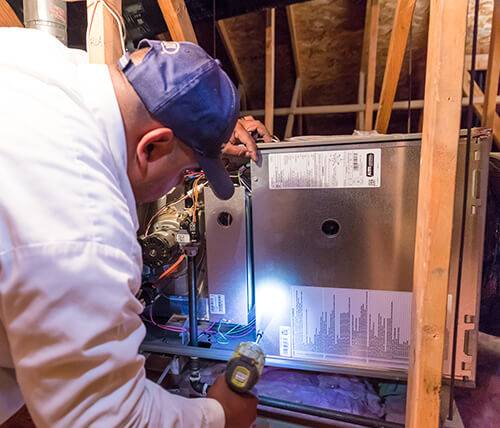
Locked systems usually show a blink code or an error on the control board or the unit’s display. Photograph any blinking lights or error codes. Some lockouts clear after a timed power cycle, while persistent lockouts indicate an unresolved fault that requires a technician.
Is the furnace showing an error code?
Check the control board or the unit display for blinking lights or error codes and record the pattern. Count blinks and note pauses between sequences. The furnace manual and many manufacturer sites list code meanings; share these with a technician to speed diagnosis. For general references, see ASHRAE Technical Resources.
Has the pilot light or ignition failed?
Gas furnaces use a pilot light, hot surface igniter, or spark to light burners. If ignition fails, you may hear the blower run with no flame. Ignition parts can be fragile and involve gas controls; do not attempt to repair ignition systems yourself. Call a trained HVAC technician to test and replace ignition components.
Are circuit breakers or fuses tripped?
Heating systems need power for controls and blowers. Check your breaker panel and reset any tripped breakers. If a breaker trips again immediately, stop and call an electrician or HVAC tech. Repeated electrical trips often indicate a failing motor, short, or control fault that needs professional evaluation.
Are filters, vents, and ducts clean?
Restricted airflow is a leading cause of weak heat. Dirty filters, closed vents, and blocked returns reduce airflow and cause uneven room temperatures. A heavily restricted system can overheat and trip safety limits, which may shut the furnace down.
Inspect filters, supply registers, and return grilles. Replace or clean filters, open closed registers, and remove obstructions. For persistent airflow issues or ductwork problems, call a professional to test and seal ducts and to balance the system.
When to replace the air filter?
Check the filter first when heat output feels low. Replace disposable filters every 1–3 months depending on use, pets, and indoor air quality. A very dirty filter can restrict airflow dramatically and cause the system to run inefficiently or to overheat and shut off.
Could closed vents or blocked returns reduce heat?
Closed registers, blocked furniture, or rugs over return grilles reduce airflow and can make some rooms cold. Open both supply and return vents to allow air to circulate. If problems persist, professional balancing or duct repairs may be needed to restore even heat distribution. For guidance on airflow and system standards, see ASHRAE Technical Resources.
How to evaluate cost and urgency
Deciding whether to repair or replace depends on system age, severity of the fault, and cost. Safety issues such as gas leaks or signs of combustion failure require immediate service. Non‑safety faults may be scheduled during normal business hours for cost savings.
Gather facts before calling contractors. Note the unit age, model and serial numbers, any error codes, and your recent service history. These details let a technician give a more accurate estimate over the phone and help you compare multiple quotes.
How long will a typical repair take?
Simple fixes like replacing filters, batteries, or a thermostat often take 30–90 minutes. Replacing ignitors, flame sensors, or small motors can take a few hours. Large jobs, such as changing a heat exchanger or replacing a compressor, can take a day or more and may require special parts or permits.
Key takeaways and next steps
If heat stops, start with safe, simple checks: thermostat mode, power at the breaker, and the air filter. These steps resolve many common issues. If you detect gas or CO hazards, evacuate immediately and call emergency services before any other actions.
When you contact a technician, provide clear notes, photos, and error codes. That speeds diagnosis and can reduce service time. If the issue is electrical, combustion, or refrigerant related, schedule a licensed HVAC visit and avoid DIY repairs that involve gas or controls.
What immediate steps should you take?
Set the thermostat to HEAT and raise the setpoint to force a call for heat. Check the breaker and the furnace service switch and replace thermostat batteries if needed. Replace a very dirty filter and clear snow, ice, or debris from outdoor units. Document any error codes, blinking lights, and unusual sounds or smells and take photos for the technician.
Action checklist
- Photograph the unit label, thermostat display, and any error lights.
- Note unit model, serial number, and age.
- Replace filters and thermostat batteries if applicable.
- Open closed vents and clear outdoor unit of snow or debris.
- Evacuate and call emergency services if you smell gas or a CO alarm sounds.
Need HVAC service help in Las Vegas?
If you're facing an HVAC emergency in Las Vegas, Henderson, or North Las Vegas, The Cooling Company offers fast, reliable service from licensed technicians. We understand that heating and cooling emergencies don't wait for business hours.
Call us now at (702) 567-0707 for emergency service. Our team is ready to help restore your comfort quickly and safely.
Related reading: what to explore next?
- Electrical Panel Upgrade Tax Credit: What Qualifies and How to Claim
- Heater Not Turning On: Quick Troubleshooting Steps
- Furnace Troubleshooting Las Vegas
- Heating Repair Cost Las Vegas
About The Cooling Company
- Phone: (702) 567-0707
References
- U.S. Department of Energy (Energy.gov) (accessed 2025-12-26)
- U.S. Environmental Protection Agency (EPA) (accessed 2025-12-26)
- ASHRAE (Standards and guidance) (accessed 2025-12-26)
- ENERGY STAR (Heating & cooling) (accessed 2025-12-26)
Related service: Need HVAC help in Las Vegas? Explore our heating services and AC repair services for Las Vegas homeowners.
Need HVAC Service in Las Vegas?
The Cooling Company provides expert HVAC service throughout Las Vegas, Henderson, and North Las Vegas. Our licensed technicians deliver honest assessments, upfront pricing, and reliable results.
Call (702) 567-0707 or visit heating, furnace repair, heat pump installation, or heating maintenance for details.