

Short answer: Check thermostat mode, batteries, and breakers first. If the system still won’t respond, document symptoms and call a licensed technician.
What can cause thermostat failures
- Dead batteries or power loss
- Loose or corroded wiring
- Incorrect mode or schedule settings
- Old thermostats with drifting sensors
- Control board or transformer issues
Welcome to our step-by-step guide which will navigate you through some issues that can spring up with your home thermostat. The vital function of a thermostat in regulating our home's energy use and helping our HVAC systems run efficiently is something to keep in mind. Recognizing signs of potential issues and understanding how to follow some quick tips, will help you extend the lifespan of this crucial device.
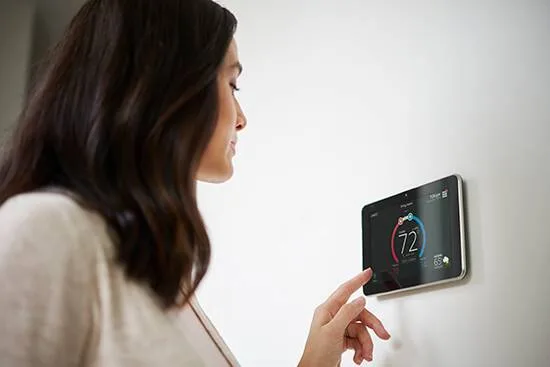
Local essentials and challenges for Las Vegas thermostats
- Heat spikes: Rapid afternoon temperature jumps can expose sensor drift.
- Dust buildup: Fine desert dust can affect sensors and buttons.
- Older wiring: Mid-century homes often have aging low-voltage wiring.
- Rooftop units: Longer wiring runs can cause signal issues.
- Peak rates: Smart scheduling helps avoid 1–7 PM power costs.
- You depend on your AC to understand the soaring summer temperatures, so the last thing you want is to realize your AC unit isn’t working. With the correct equipment and a few simple tests, you can troubleshoot and diagnose the problem yourself. Don't call a technician just yet.
- We all know that our home thermostat, which is usually mounted on a wall, is something akin to the control center for our home's HVAC systems, including furnaces and AC units. This article aims to help you diagnose and address these issues, especially those relating to function, and offer potential solutions that could save you money on unnecessary service calls.
The first step, known as 'Step 1', is understanding the wiring and calibration of your home thermostat and the operation settings of your AC system, including the blower function which circulates air through the ducts, is crucial. In addition to these steps, keeping an eye on the dust accumulation on the screen of your home thermostat can also save you energy and money over time. Identifying the signs that something might be amiss can mean the difference between a simple fix and a costly one; a misaligned circuit breaker, for instance, could cause the furnace burner to malfunction. From your personal experience, you might have seen that there are several logical steps you can take to decide whether the thermostat is the problem or if your air conditioning system is to blame. After all, there’s no reason to go through the hassle of scheduling a service call if a fresh battery or a simple thermostat setting change is all you need to get your AC unit into perfect operation mode.
Testing Your HVAC Thermostat
Step One
First, make sure the thermostat switch is in the “on” position and set to “cool” or AC. If that doesn't solve the problem, check a programmable thermostat's display for any override programs that may have engaged and caused an issue with the air conditioner. This is a tip particularly intended for those tech-savvy ones among you.
Step Two
In some cases, programmable thermostats require batteries. If this is the case, it's time to grab your trusty screwdriver and replace them with new batteries to ensure the thermostat's circuit has power, as this might restore the functionality of the device and solve the problem.
Step Three
This step uses a helper to confirm whether the thermostat is actually sending the signal to the furnace or air handler. Doing this helps isolate the problem between the thermostat and the HVAC equipment.
Practical method
- Have someone stand by the furnace or air handler while you operate the thermostat.
- Switch the thermostat from "off" to "heat" or "cool" and change the set temperature at least 5 degrees above (for heat) or below (for cool) the current room temperature.
- Listen for a click at the thermostat and then listen at the furnace or air handler for the blower or ignition sequence.
What to watch and how to interpret it
- If you hear the thermostat click but the unit does not respond, the wiring or control board at the furnace may be at fault.
- If there is no click at the thermostat, the thermostat may not have power or the internal relay is faulty.
- Delayed response of more than 30 seconds for the AC can indicate a control or compressor delay, which can be normal for some systems but not for prolonged or repeated delays.
Safety and timing
- Wait up to 60 seconds after switching modes for some systems to react. If nothing happens, turn the thermostat off and proceed to the next diagnostic step.
- Avoid working on wiring unless you are comfortable and have turned off the breaker at the service panel.
Local note
- In Las Vegas neighborhoods with older homes, such as East Las Vegas or some parts of Downtown, wiring and older control boards can be common failure points. If you suspect wiring issues, contact The Cooling Company for a safe inspection.
Testing Your HVAC Thermostat
Your thermostat is the control center for your home comfort, and in Las Vegas summers it works harder than in most cities. High daytime temperatures regularly top 100°F, which makes a working thermostat essential to avoid high energy bills and a hot, unsafe home.
Before doing any testing, try these quick checks to rule out common, easy fixes:
Quick pre-check checklist
- Make sure the thermostat is set to "cool" and the set temperature is at least 5 degrees below room temperature.
- Inspect the display for blank screens or error codes. A blank screen often means no power.
- Replace batteries on battery-powered models every 12 months, or sooner if the low battery icon appears.
- Check your circuit breaker panel for a tripped AC or furnace breaker and reset if needed.
- Ensure vents are open and filters are clean. Restricted airflow can make the system seem like a thermostat issue.
Why these matter in Las Vegas
- With long AC runtime in Summerlin, Henderson, and the Strip-area homes, batteries and dusty sensors fail faster. Regularly changing batteries and cleaning the area around the thermostat reduces false readings and unnecessary service calls.
Expert tip from The Cooling Company
- If your thermostat is more than 10 years old or a basic mechanical model, consider upgrading to a programmable or smart thermostat for greater temperature control and energy savings. Read more about thermostat options and benefits in our guide on why Lennox thermostats may help improve comfort and save energy: /blog/why-are-lennox-thermostats-better-guide/
(Internal link added naturally for readers wanting to upgrade)
Step Seven
Thermostat Troubleshooting Checklist for Las Vegas
Follow this systematic checklist before calling for service. Most thermostat problems can be resolved with these simple checks.
Step 1: Basic Settings Check (30 seconds)
- Confirm thermostat is set to COOL (summer) or HEAT (winter)
- Verify setpoint is at least 5°F below (cooling) or above (heating) room temperature
- Check for schedule locks or holds on programmable/smart thermostats
- Look for error codes on the display
Step 2: Power Check (1 minute)
- Check if display is blank or dim—replace batteries if needed
- Check circuit breaker panel for tripped AC or furnace breaker
- Verify furnace power switch is ON (usually near the unit)
- For wired thermostats, check for loose wiring connections
Step 3: System Response Test (2 minutes)
- Change thermostat setpoint significantly (5+ degrees)
- Listen for click at thermostat
- Listen for system startup (blower, compressor, or ignition)
- Note any delays or unusual behavior
Step 4: Visual Inspection (1 minute)
- Check for dust accumulation on thermostat
- Look for visible wiring damage or corrosion
- Verify thermostat is level and properly mounted
- Check for heat sources near thermostat (lamps, windows, vents)
Step 5: When to Call a Professional
- No display after checking breakers and replacing batteries
- Repeated short cycling or frequent on/off cycles
- Thermostat bypass makes system run but replacement didn't fix issue
- Visible wiring damage, burning smell, or sparks
- System fails during extreme heat (110°F+)—emergency priority
When to Call The Cooling Company in Las Vegas
Some thermostat issues are quick fixes, but others need a licensed technician. Call us at (702) 567-0707 if you see any of the following:
- No display after checking breakers and replacing batteries.
- Repeated short cycling or frequent on/off cycles.
- Thermostat bypass makes the system run but replacing the thermostat did not fix the issue.
- Visible wiring damage, burning smell, or sparks.
- System fails during extreme heat in Summerlin, Henderson, Green Valley, or other Las Vegas neighborhoods, when quick response can prevent home damage.
We offer AC repair, heating repair, thermostat installation, and maintenance services throughout Las Vegas, Henderson, and North Las Vegas.
What to expect from our visit
- A licensed comfort specialist will test thermostat signals, inspect wiring and the control board, and recommend repair or replacement.
- We help match compatible replacements, for example ensuring coil and control matches when swapping components. Learn about coil pairing for Summerlin homes here: /blog/lennox-coil-pairing-chart-summerlin-guide/
- If a replacement is recommended, we will review options and long-term costs, using resources like our Lennox system pricing guide: /blog/lennox-system-pricing/
Local response and emergency care
- During peak summer days we prioritize emergency heat and cooling failures across Las Vegas. If your home is at risk from extreme indoor heat, contact us for priority scheduling.
(Internal links added: coil pairing and system pricing for homeowners considering replacements)
How to Check a Thermostat with a Multimeter
If you have a multimeter, you can confirm whether your thermostat is providing 24 volts to the HVAC system. This test gives a clear answer about electrical power without opening the furnace.
- Set your multimeter to AC volts, 0-50 VAC range.
- With thermostat powered on and set to call for cooling or heating, remove the thermostat cover to access terminals.
- Measure between R and C (or R and B on some systems) for 24 VAC. If there is 20 to 30 VAC, power is present.
- If voltage is present but the equipment does not respond, the thermostat relay or control signal may be failing.
- For continuity tests on fan or sensor wires, switch the meter to continuity and test between terminals per your thermostat wiring diagram.
Safety and interpretation
- Turn off power at the breaker before touching furnace wiring.
- If you read zero volts at R and C, the problem is usually the transformer or the breaker feeding the HVAC. Call The Cooling Company if you are unsure how to proceed.
When to avoid DIY
- If you are unfamiliar with electrical testing, or your home uses hydronic or line-voltage heaters, stop and call a licensed technician. High-voltage systems require specialist training.
Bypassing the thermostat to test the furnace is a useful diagnostic but must be done carefully. This step determines whether the thermostat is the root cause.
Step-by-step bypass test
- Turn off power to the furnace at the breaker.
- Remove the thermostat cover and take a clear photo of the wiring for reinstallation.
- Identify the R (24V hot) and W (heat call) terminals.
- Loosen the screws and gently disconnect the wires. Twist the exposed copper ends of R and W together to create a short. This closes the circuit and simulates a call for heat.
- Restore power to the furnace at the breaker. If the furnace starts, the thermostat is likely the problem.
What results mean
- Furnace starts after bypass: thermostat is faulty, replace it or have a technician install and configure a new unit.
- Furnace does not start: problem is upstream at the furnace control board, transformer, or wiring. Contact The Cooling Company for diagnosis.
Safety warnings
- Always turn off power at the breaker before touching thermostat wiring.
- Use insulated tools and avoid letting wires touch metal surfaces.
- If you see corroded or frayed wires, stop and call a licensed technician.
Replacement guidance
- If you determine you need a replacement thermostat, a modern programmable or smart thermostat can reduce runtime and improve comfort in Las Vegas heat. For cost and system compatibility guidance, view our Lennox system pricing and comparison resources: /blog/lennox-system-pricing/ and for brand comparisons see /blog/lennox-vs-trane-ac-las-vegas/.
Thermostat Repair and Replacement Costs in Las Vegas
Thermostat repair and replacement costs vary based on the issue and type of thermostat:
- Battery replacement: $5-15 (DIY) or $50-100 (service call)
- Wiring repair: $150-300 for loose connections or minor wiring fixes
- Basic programmable thermostat: $150-300 installed
- Smart thermostat: $250-500 installed (Nest, Ecobee, Honeywell)
- Control board issues: $300-800 if thermostat replacement doesn't fix the problem
Las Vegas cost context: During peak summer months, emergency service calls may include priority fees ($50-150). Smart thermostats can save $12-60/month on cooling bills through scheduling and peak avoidance, paying for themselves in 4-12 months. Older mechanical thermostats often drift out of calibration in extreme heat, making replacement more cost-effective than repeated calibration.
Las Vegas thermostat cost drivers
- Compatibility: Some systems need a C-wire or power extender.
- Access: Rooftop or attic equipment increases diagnostic time.
- Smart features: Wi-Fi models add setup and app configuration time.
- Wiring repairs: Brittle or corroded wiring needs replacement.
- After-hours visits: Heat-wave demand can add priority fees.
Decision guidance: thermostat next steps
- Recalibrate: Small temperature drift with a newer thermostat.
- Replace: 10+ year old or repeated power/sensor failures.
- Upgrade: Use smart scheduling to cut peak-hour runtime.
- Call now: No display, burnt smell, or frequent short cycling.
Prevention and Maintenance Tips
Regular maintenance extends thermostat life and prevents failures:
- Battery replacement: Replace batteries annually, or sooner if low battery icon appears
- Dust cleaning: Gently clean thermostat faceplate monthly to prevent sensor issues
- Calibration check: Compare thermostat reading to room thermometer—if off by 3+ degrees, consider replacement
- Wiring inspection: Have technician inspect wiring every 3-5 years for corrosion or damage
- Upgrade old thermostats: Replace mechanical or basic models older than 10 years
- Proper placement: Ensure thermostat is away from heat sources, direct sunlight, and drafts
- Schedule maintenance: Include thermostat check in annual HVAC tune-up
Las Vegas-specific maintenance: Desert dust accumulates faster on thermostats, requiring monthly cleaning. Extreme heat can damage older thermostats—if your thermostat is more than 10 years old, consider upgrading before summer. During heat waves, check thermostat daily for proper operation. Programmable and smart thermostats with scheduling can reduce AC runtime by 5-15%, saving energy and reducing wear on your system.
Need HVAC Service in Las Vegas?
The Cooling Company provides expert HVAC service throughout Las Vegas, Henderson, and North Las Vegas. Our licensed technicians deliver honest assessments, upfront pricing, and reliable results.
Call (702) 567-0707 or visit AC repair, maintenance, heating, or installation for details.
Share This Page
Neighborhoods we serve for thermostat service
We serve homeowners in Summerlin, Green Valley, Inspirada, Centennial Hills, Desert Shores, and Henderson. Tell us your thermostat model and neighborhood so we can bring the right parts.
Trust and guarantees
- Serving Las Vegas since 2011
- Licensed, insured, and EPA-certified technicians
- Clear diagnostics and replacement options
- Workmanship-backed service
- 100% satisfaction guarantee